Technical Guide
LangGraph Agent Governance in 3 Steps
A practical walkthrough for adding governance controls to a LangGraph agent using OpenBox.
Published on

Who this is for: Engineering teams running production LangGraph agents that need AI agent governance, real-time observability, and human-in-the-loop approval controls. If your LangGraph agent calls external tools, writes to databases, or executes HTTP requests without an enforcement layer, this walkthrough shows you how to add one using the OpenBox LangGraph SDK.
LangGraph makes it straightforward to build agents that call tools, query databases, and make HTTP requests across multi-step workflows. What it does not give you is any visibility into what those agents are actually doing at runtime, any enforcement layer that can stop a bad action before it executes, or any record of who approved what.
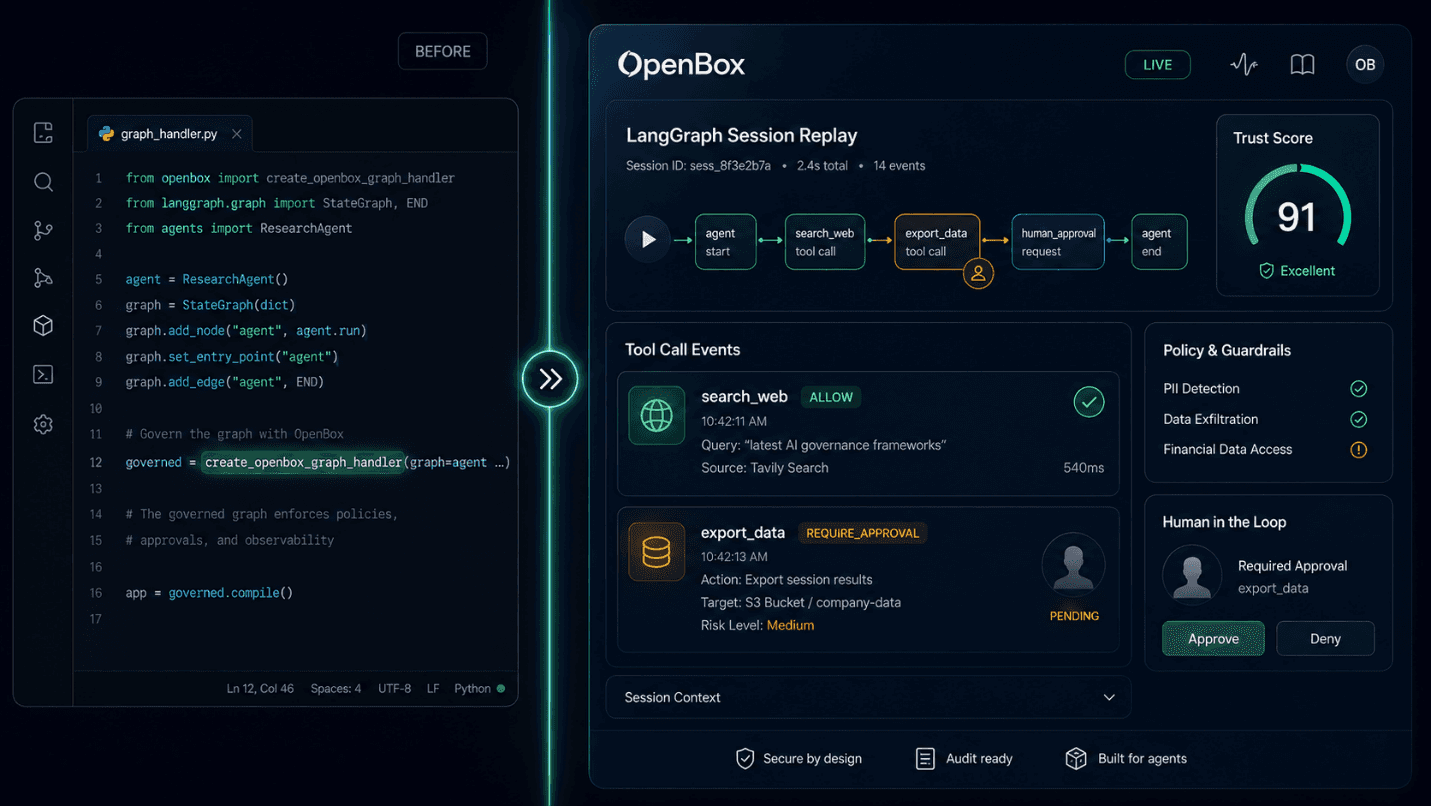
This walkthrough shows exactly what it takes to add that layer. We start with a real LangGraph agent, wrap it with OpenBox using create_openbox_graph_handler, add a Rego policy that routes sensitive tool calls to human review, and show what you get in the dashboard afterward. The agent code does not change.
We will also be honest about what this does not do. Governance infrastructure involves real tradeoffs, and you should understand them before adding a dependency to production code.
The Agent Before: Functional, Unmonitored
Here is a representative LangGraph agent. It uses a ReAct pattern with two tools: one that searches the web and one that exports data to an external system. Standard setup.
# agent.py (before OpenBox)
import asyncio from langgraph.prebuilt import create_react_agent from langchain_openai import ChatOpenAI def search_web(query: str) -> str: # calls external search API via httpx ... def export_data(destination: str, payload: dict) -> str: # writes to external endpoint ... llm = ChatOpenAI(model="gpt-4o-mini") agent = create_react_agent(llm, tools=[search_web, export_data]) async def main(): result = await agent.ainvoke( {"messages": [{"role": "user", "content": "Export the Q2 report"}]}, config={"configurable": {"thread_id": "session-001"}}, ) print(result["messages"][-1].content) asyncio.run(main()) |
This agent will run. It will also call export_data with whatever arguments the LLM decides on, against whatever destination it infers, with no check that the action was intended, no record of the decision, and no way to stop it mid-flight.
Every tool call the LLM plans is also a decision your system is making on behalf of a user. Those decisions need the same accountability as any other system action.
Step 1: Install the SDK and Register Your Agent
Requirements: Python 3.11+, langgraph >= 0.2, langchain-core >= 0.3.
# Install
pip install openbox-langgraph-sdk-python # or with uv uv add openbox-langgraph-sdk-python |
Then register an agent in the OpenBox dashboard at dashboard.openbox.ai. Give it a name that matches what you will pass in code. Copy the API key (it will look like obx_live_... or obx_test_...). Set two environment variables:
# Environment
export OPENBOX_URL="https://core.openbox.ai" export OPENBOX_API_KEY="obx_live_..." # Optional: enable cryptographic attestation (Agent Identity) export OPENBOX_AGENT_DID="did:openbox:..." export OPENBOX_AGENT_PRIVATE_KEY="..." |
That is the minimum setup required to get the agent wrapped and emitting governance events. Optionally, set OPENBOX_AGENT_DID and OPENBOX_AGENT_PRIVATE_KEY (retrieved from Agent Settings in the dashboard) to enable cryptographic attestation of execution evidence. Without them, OpenBox uses AWS KMS signing by default. Policies and guardrails are configured per-agent in the dashboard and evaluated at runtime against each tool call.
Step 2: Wrap the Compiled Graph with OpenBox Governance
One function call wraps your compiled graph. The agent itself does not change.
# agent.py (after Step 2)
import os import asyncio from langgraph.prebuilt import create_react_agent from langchain_openai import ChatOpenAI from openbox_langgraph import create_openbox_graph_handler def search_web(query: str) -> str: ... def export_data(destination: str, payload: dict) -> str: ... llm = ChatOpenAI(model="gpt-4o-mini") agent = create_react_agent(llm, tools=[search_web, export_data]) governed = create_openbox_graph_handler( graph=agent, api_url=os.environ["OPENBOX_URL"], api_key=os.environ["OPENBOX_API_KEY"], agent_name="MyAgent", # must match name in dashboard # Optional: cryptographic attestation; obtain from Agent Settings in dashboard agent_did=os.environ.get("OPENBOX_AGENT_DID"), agent_private_key=os.environ.get("OPENBOX_AGENT_PRIVATE_KEY"), tool_type_map={ "search_web": "http", "export_data": "http", }, ) async def main(): result = await governed.ainvoke( {"messages": [{"role": "user", "content": "Export the Q2 report"}]}, config={"configurable": {"thread_id": "session-001"}}, ) print(result["messages"][-1].content) asyncio.run(main()) |
What this does
create_openbox_graph_handler intercepts the LangGraph v2 event stream. It sends a governance event to OpenBox before every tool call (ActivityStarted) and after every tool call (ActivityCompleted). It also intercepts outbound HTTP requests automatically and can capture database queries and file I/O when configured. All interception happens without any instrumentation in your tool code.
The tool_type_map parameter provides the platform with semantic context for each tool: it controls how operations appear in the execution tree and dashboard. Supported values are http, database, builtin, a2a, and custom. In Rego policies, match on input.activity_type using the tool function name directly (for example, "search_web" or "export_data") ; not the mapped type string. The type is also available in Rego via the __openbox metadata appended to activity_input if you need type-based matching, but name-based matching is the pattern shown in the examples that follow.
What this does not do yet
At this point, governance events are flowing and the Trust Score is being built. The agent is observable. But without a policy configured in the dashboard, every tool call gets an implicit CONTINUE decision. The platform records what happens; it does not yet stop anything.
Step 3: Write a Rego Policy for LangGraph Tool Governance
Policies are written in OPA Rego and attached to the agent in the dashboard under Agent > Authorize > Policies. They are evaluated server-side against each ActivityStarted event. The SDK does not need to change when you add or update a policy.
Here are two policies that reflect realistic requirements.
Policy A: Block searches on restricted topics
# Rego: block_restricted_search.rego
package openbox import future.keywords.if import future.keywords.in default result = {"decision": "CONTINUE", "reason": null} restricted_terms := {"competitor_x", "internal_project_atlas"} result := { "decision": "BLOCK", "reason": "Search term matches restricted topic list.", } if { input.event_type == "ActivityStarted" input.activity_type == "search_web" not input.hook_trigger count(input.activity_input) > 0 entry := input.activity_input[0] is_object(entry) some term in restricted_terms contains(lower(entry.query), term) } |
The not input.hook_trigger guard is required. The SDK's HTTP layer also fires governance events when your tool makes an outbound request. Without this guard, a BLOCK rule would fire twice: once on the tool call and once on the underlying HTTP request that tool makes. Always include this guard on BLOCK and REQUIRE_APPROVAL rules.
Policy B: Require human approval before any data export
# Rego: approve_exports.rego
package openbox import future.keywords.if default result = {"decision": "CONTINUE", "reason": null} result := { "decision": "REQUIRE_APPROVAL", "reason": "Data export requires human sign-off before execution.", } if { input.event_type == "ActivityStarted" input.activity_type == "export_data" not input.hook_trigger } |
When this policy fires, the agent pauses. The tool does not execute. The REQUIRE_APPROVAL decision appears in the OpenBox dashboard Approvals queue. A human approves or rejects. The SDK polls for that decision at the interval you configure, then resumes or surfaces ApprovalRejectedError.
To enable HITL polling, pass the hitl config to create_openbox_graph_handler:
# HITL configuration: add to the handler from Step 2
governed = create_openbox_graph_handler( graph=agent, api_url=os.environ["OPENBOX_URL"], api_key=os.environ["OPENBOX_API_KEY"], agent_name="MyAgent", tool_type_map={ # from Step 2: include all parameters "search_web": "http", "export_data": "http", }, hitl={ # add this "enabled": True, "poll_interval_ms": 5_000, # 5 seconds (5000 ms) }, ) |
Handle LangGraph Governance Errors Explicitly
Governance decisions surface as typed exceptions. You should handle these explicitly in production code. Each exception type corresponds to a specific platform verdict.
# Error handling
from openbox_langgraph import ( GovernanceBlockedError, GovernanceHaltError, GuardrailsValidationError, ApprovalRejectedError, ApprovalTimeoutError, ) try: result = await governed.ainvoke( {"messages": [{"role": "user", "content": "Export the Q2 report"}]}, config={"configurable": {"thread_id": "session-001"}}, ) except GovernanceBlockedError as e: print(f"Action blocked by policy: {e}") except GovernanceHaltError as e: print(f"Session halted: {e}") except GuardrailsValidationError as e: print(f"Guardrail triggered: {e}") except ApprovalRejectedError as e: print(f"Human rejected the action: {e}") except ApprovalTimeoutError as e: print(f"HITL approval timed out: {e}") |
Exception Reference
Exception | When raised | Recovery |
GovernanceBlockedError | Policy returned BLOCK | Action did not execute. Agent continues. |
GovernanceHaltError | Policy returned HALT | Entire session terminated. |
GuardrailsValidationError | Guardrail fired on LLM prompt or output | Content was blocked or redacted. |
ApprovalRejectedError | Human rejected a REQUIRE_APPROVAL decision | Tool did not execute. |
ApprovalTimeoutError | HITL polling exceeded the server-controlled timeout. | Operation timed out. Follow up with the human reviewer. |
What You Get in the OpenBox Governance Dashboard
After the agent runs with governance active, the OpenBox dashboard shows:
Trust Score A 0-100 score calculated as: (Risk Profile Score x 40%) + (Behavioral x 35%) + (Alignment x 25%). Risk Profile Score is set at agent registration (Assess phase). Behavioral reflects policy compliance (Authorize and Monitor phases). Alignment reflects goal consistency (Verify phase). Behavioral and Alignment components start at 100 for new agents. The overall Trust Score at initialization depends on the Risk Profile Score configured at agent registration. A high-risk agent may start with a low score. The Behavioral component updates continuously as violations occur during a session. The Alignment component updates at session completion. Violations reduce the Behavioral component.
Session Replay A timestamped decision log for every operation in the session: tool calls, LLM invocations, outbound HTTP requests, database queries. Each entry shows the governance verdict for that operation. You can see exactly what the agent did and what was allowed, blocked, or routed for approval.
Immutable Audit Trail Every governance event is recorded with the timestamp, verdict, reason, and (for REQUIRE_APPROVAL events) the approver identity and decision timestamp. Records cannot be modified after creation.
Approvals Queue REQUIRE_APPROVAL decisions appear here for human review before the tool executes. The agent is paused. The reviewer sees the operation context and issues the decision from the dashboard.
LangGraph Governance Limits: What This Integration Does Not Cover
Governance tooling that overstates its coverage is worse than none, because it creates false confidence. Here is what this integration does not provide:
It does not make your agent's LLM decisions safe. OpenBox governs tool calls and outputs, not the LLM's reasoning. If the LLM produces a harmful response that does not trigger a guardrail threshold, that response passes through. Guardrails add a content filter layer; they are not a reasoning auditor.
Policies do not automatically write themselves. You get the enforcement engine. You write the rules. If you do not configure policies that cover your risk surface, the agent runs with implicit CONTINUE on every tool call.
HITL requires someone on the other end. REQUIRE_APPROVAL pauses the agent and routes to a human. If no one is reviewing the Approvals queue, the operation sits pending until ApprovalTimeoutError fires. The control is only as good as the process behind it.
fail_open is the default on API errors. If OpenBox Core is unreachable, the default behavior (on_api_error="fail_open") allows tool calls to proceed. For high-sensitivity deployments, set on_api_error="fail_closed" to block tool calls when governance is unavailable.
A governance layer that does not enforce is a logging layer with extra steps. Understand what each control actually does before you rely on it.
Debugging Your LangGraph Governance Integration
One environment variable gives you full request/response logging for every governance call the SDK makes:
# Debug mode
OPENBOX_DEBUG=1 python agent.py # Output: # [OpenBox Debug] governance request: # { "event_type": "ActivityStarted", "activity_type": "export_data", ... } # [OpenBox Debug] governance response: # { "verdict": "require_approval", ... } # # Note: verdict values appear lowercase in raw API responses. # The platform terms ALLOW, BLOCK, HALT, REQUIRE_APPROVAL correspond to allow, block, # halt, require_approval in the wire format. |
This is useful when validating that your Rego policy is receiving the input fields you expect. Pair it with the OPA Playground (play.openpolicyagent.org) to test policy logic against real payloads before pushing to the dashboard.
Summary: LangGraph Governance with OpenBox
Three concrete changes to an existing LangGraph agent:
pip install openbox-langgraph-sdk-python and set two environment variables.
Replace agent.ainvoke with governed.ainvoke using create_openbox_graph_handler.
Write a Rego policy in the dashboard that enforces the rules your application actually requires.
After those three steps, every tool call, LLM prompt, outbound HTTP request, database query, and file operation the agent makes passes through the policy engine. Verdicts are enforced at execution time. Every session produces an immutable, replayable audit trail. Human-in-the-loop gates are enforced, not advisory.
The agent code does not change. The governance layer is independent of it.
Frequently Asked Questions: LangGraph Agent Governance
What is LangGraph agent governance?
LangGraph agent governance is the practice of adding policy enforcement, action monitoring, and human review controls to LangGraph agents running in production. The OpenBox platform inserts a governance layer between your compiled LangGraph graph and the tools it calls, evaluating every action against configurable Rego policies before execution. This enables AI agent compliance monitoring, real-time auditability, and enforcement of human-in-the-loop gates.
Does adding OpenBox governance require changes to my LangGraph agent code?
No. The create_openbox_graph_handler function wraps your compiled graph without modifying it. The only change to your code is replacing agent.ainvoke with governed.ainvoke. Your graph definition, tool implementations, and LangChain configuration remain unchanged.
What LangGraph versions does OpenBox support?
The OpenBox LangGraph SDK (version 0.1.2, current as of June 2026) requires langgraph >= 0.2, langchain-core >= 0.3, and Python 3.11+. It is compatible with the full LangGraph 1.x release line, including the latest LangGraph 1.2.x builds.
How does human-in-the-loop (HITL) approval work in LangGraph?
When an OpenBox policy returns REQUIRE_APPROVAL, the agent pauses before the tool call executes. The pending operation appears in the OpenBox Approvals queue in the dashboard. A designated reviewer approves or rejects the action. The SDK polls for that decision at the configured interval (poll_interval_ms, default 5000 ms) and either resumes execution or raises ApprovalRejectedError. For HITL to function reliably in production, the Approvals queue must be actively monitored.
Is this integration suitable for production LangGraph deployments?
Yes, provided you configure policies that cover your actual risk surface and staff the Approvals queue for REQUIRE_APPROVAL gates. For high-sensitivity deployments, set on_api_error="fail_closed" to block all tool calls if the OpenBox API becomes unreachable. See the LangGraph Governance Limits section for a full account of what this integration does and does not cover.
What is the difference between governance policies and guardrails in OpenBox?
Policies (written in OPA Rego) govern tool calls: they run on ActivityStarted events and determine whether a tool call proceeds (CONTINUE), is blocked (BLOCK), requires human approval (REQUIRE_APPROVAL), or terminates the session (HALT). Guardrails govern LLM content: they screen prompts and model outputs for PII, toxic content, banned terms, and custom regex patterns. Both layers run server-side on OpenBox Core. You configure them independently in the dashboard without changing SDK code.
Resources
SDK: github.com/OpenBox-AI/openbox-langgraph-sdk-python
PyPI: pypi.org/project/openbox-langgraph-sdk-python
Dashboard: dashboard.openbox.ai
Docs: docs.openbox.ai
Enterprise: contact@openbox.ai
All code in this article is sourced from the official openbox-langgraph-sdk-python README and OpenBox documentation (docs.openbox.ai). Requirements and API signatures reflect SDK version 0.1.2 (verified current as of June 2, 2026).